
This is my first post about Otto The Tag Auditor. Otto is the agentic AI I am building for marketing tag audits.
The aim is a four-step workflow.
- Scan the site.
- Evaluate what the scan found.
- Give an actionable recommendation, including what it costs the numbers if you leave the fail sitting.
- Scan again later as a health check, so the same site can be reopened after a fix.
That loop is how I apply AI in marketing. This first post is about that path, not about using a model to assemble a side tool.
The core product aim is a GA4 audit, with optional audits for common ad platforms: Google Ads, Meta Ads, and Floodlights (Campaign Manager / Floodlight). That is the direction I am building toward — not a GA-only tool forever.
Campaign optimisation and reporting both rest on tags. Tags are the tracking on a website that tells analytics, and the channels that depend on it, what actually happened. When those tags are weak, the number a marketer is about to act on drifts. The check that would have caught it is still often a slow, technical, manual pass through a site, a container, and a spreadsheet.
At WPP Media I sat in analytics and MarTech. The useful output was whether that number was real. That experience sits in the background. The product in front is the agentic flow.
I think of the intended shape as a tag-auditing version of Screaming Frog: crawl and diagnose at scale. The metaphor is secondary. The product is the AI path.
The agentic loop I am aiming at
Scan. Walk the site and collect what tagging is actually doing on the pages.
Evaluate. Check that evidence against a living checklist I keep as the source of truth. Excel can seed the checklist. You do not run the weekly audit from the spreadsheet — the dashboard is what you reopen.
Recommend. Put business impact and a next step on a dashboard a person can reopen. A measurement owner, or a marketer briefing a developer, should leave with a job, not a wall of checks.
Health check. Crawl the same site again after a fix, and keep doing it, so health is a loop rather than a one-off export you file.
Later, the same flow should implement the fixes. That part is not in yet.
An agentic workflow, in this sense, means the product is meant to carry those jobs in order, instead of leaving you to stitch a crawl, a spreadsheet, and a slide together by hand.
This is the very initial stage
I am at the start of that loop, not near the end. Otto is early.
What exists today is a local build on my PC. It is not a production deployment.
The current build works on-site GA4 tagging and data-layer health — whether the install arrived through gtag directly or through Google Tag Manager. It detects the path. Optional Google Ads, Meta Ads, and Floodlight audits are in the aim, not yet in the practice run below.
It can crawl a site and score tagging against that living checklist. The product syncs the rows. That crawl is still v1. It is incomplete, and I am still deepening how it walks the site and maps what it sees onto the checklist.
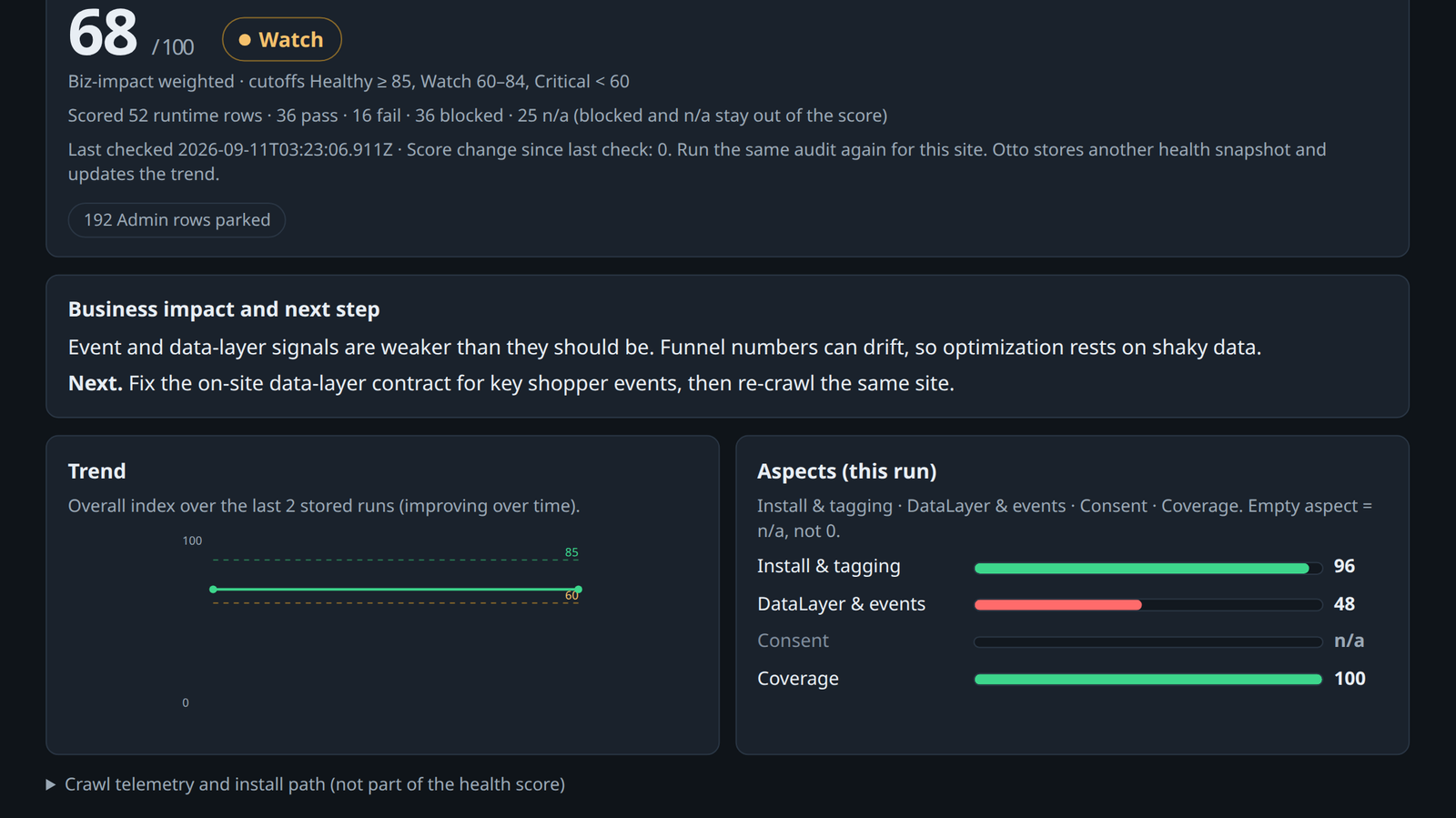
It can put a result on a web health dashboard. One score from 0 to 100. Three tiers: Healthy at 85 and above, Watch from 60 to 84, Critical below 60. Aspect bars sit under the score: install, data-layer and events, coverage. A trend sits beside them once more than one run is stored.
The first screen is the health dashboard: the score, a business-impact line, and the next step. The raw checklist questions stay off that screen.
The results layer and that dashboard still need work. The screen below is the current state of that work, not a finished results product.
When a check fails, Otto can explain what to fix in its own words, including what it costs the numbers if you leave the fail sitting. Those recommendations are still not finished. I will not write them as if that path is done.
Who it is for
Otto is aimed at two kinds of audience.
People who own tagging or measurement and need a living audit they can reopen. The person who has to say whether campaign optimisation and reporting can trust the on-site tags.
And non-technical marketers who still have to work with developers directly. They do not need to be measurement specialists. They need a screen that says what is weak, what it costs the numbers if you leave it, and what to ask a developer to fix next, so a brief to engineering is grounded rather than a vague line that tracking is broken.
That is the intended audience. This local build is not yet the complete loop I would put in their hands.
It is not a one-off spreadsheet check. It is not a general tagging platform. It is not a client case study. The run below is a practice shop I control. There is no user count to invent.
A current run on a practice site
I ran the current build on that practice shop. This is an early test of the health dashboard that exists today. It is not proof of a finished product.
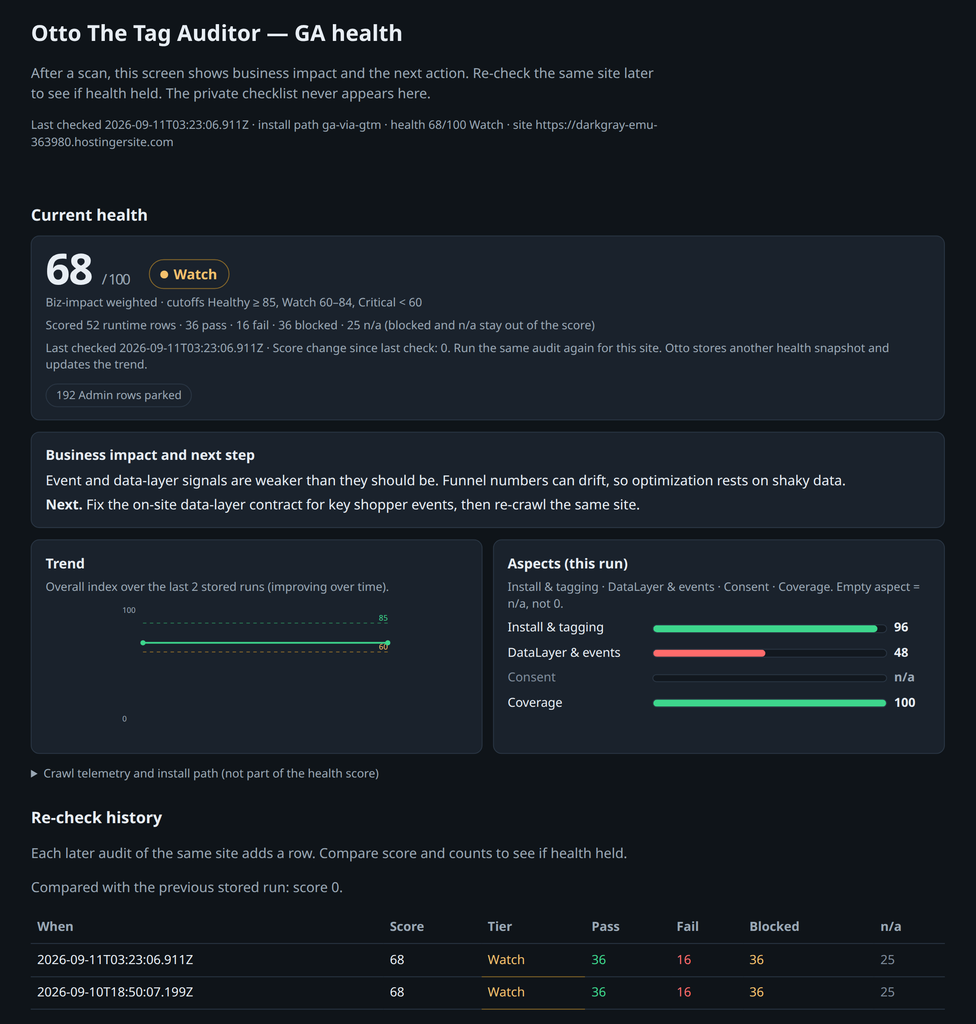
The health dashboard came back at about 68, Watch. Install sat at 96. Coverage sat at 100. Data-layer and events sat at 48. The business-impact line said event and data-layer signals were weaker than they should be, so funnel numbers can drift and optimisation rests on shaky data. The next step was to fix the on-site data-layer contract for key shopper events, then crawl the same site again.
Coverage at 100 did not pull the overall score into Healthy. Watch is the read of that run. The screen is there so the standard is visible, not so the number can be posted as a trophy.
Two stored runs sit in re-check history, both at 68 Watch, so the trend is still flat. That is the current dashboard. It is not the whole loop.
One scoring detail, kept as a product rule rather than the story of this post: a data-layer push on the page is not enough for the event bar. The crawl has to see the matching network hit.
What I will keep writing
I will keep building Otto as that agentic marketing path: scan, evaluate, recommend with business impact, then scan again as a health check. I will keep writing here as the loop fills in.
If you own tagging, or you have to brief a developer about tracking, what should the first screen tell you to do next?